
# Supporter Center Notifications
# What Is a Supporter Center Notification?
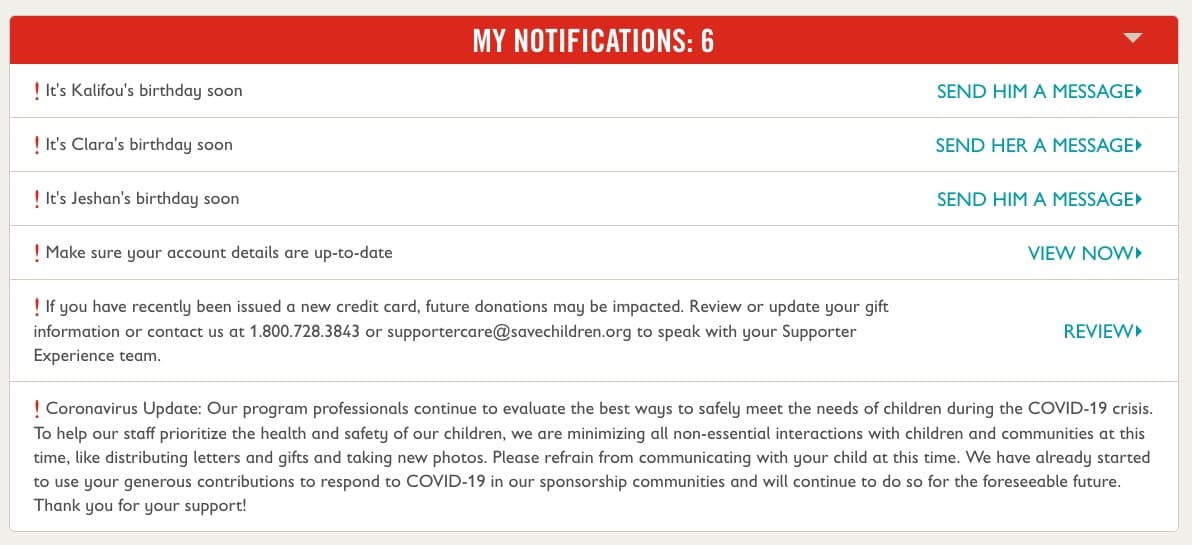
A supporter center notification displays relevant information to users on certain member center pages based on custom criteria that you set. For example, if you'd like to show a message to users that are partners for children, then you can. You can customize many elements of the notifications including the type of notification, heading, description, call to action text, call to action destination URL, start date, end date, and ranking. In addition, the to the configurable notifications, a notification will automatically appear if a constituent’s sponsored child has a birthday in the next three months and suggest that she/he send the child a message.
Supporter center notifications looks like this, example with multiple notifications:
# Finding the Notifications' Configuration
All notifications are set up in a single PageBuilder reusable page named api__supporter_center__notifications. Please make sure you have disabled the WYSIWYG editor for editing HTML before continuing.
- Go to Content -> PageBuilder
- Search for notifications
- The PageBuilder item that handles all the site alerts is named
api__supporter_center__notifications - If you simply want to look at the current content, click Edit Content on the
api__supporter_center__notifications.
# Understanding Supporter Center Notifications
There are several configurable options for each notification and several types of notifications as well. We describe all options below; options are organized in alphabetical order, not in the order of importance.
# cta_copy
This will set the button text
# cta_destination
This will set the link the button will go to.
# description
This contains the text copy of the notification.
# end_date
This is the end date for the notification. If you leave it empty, then it never ends and will always be displayed.
Date must be written in the ISO format (opens new window) it can be specified as follows:
- Using the user's local timezone:
2016-12-04T13:30:00- date and time, local time will be used2016-12-04- if using date only, midnight UTC time will be used, not local time, this format is not recommended
- Using a specific timezone:
2022-01-05T00:00:00Z- date and time uses UTC time zone2022-01-05T00:00:00-05:00- uses UTC -5 hrs NY time zone
# groupId
The group id to use for member_of_group notification type. Only users who are a member of this group will see the notification.
# id
The id is only useful for the country type. It specifies which country to show the notification on.
Lower case of capitals can be used, spaces are allow for country names that consist of two words, for example El Salvador & el salvador will both work.
# ranking
Multiple notifications will be shown to users if they match the criteria. To rank them in a certain order, then use this field. Notifications with a higher rank will be shown first in the list.
# start_date
This will be the start date for when the notification will start showing. If you leave the value empty, then the alert will be shown immediately after page publication. See end_date section for format details.
# type
The notifications type is required. Only one of the specified values must be used, any other values will generate errors:
active_partnersthis will display if the user is a partner for children, that is has an active recurring gifts, which during the sync turn on partner for children boolean flag on the profilebilling_disabledthis will display when billing update for LOM gifts are disabled globally, that isdisableBillingUpdatesis set totruechild_birthdaythis is used internally for child birthday notifications, default value can be overridden if the notification with ranking 6 or above is addedcountrythis will display if the user is on a sponsored child page from the given country or a country sponsorship pagegift_cancellation_request, this will display to users who have requested to cancel their gift, the dates should be set to blank for this to always render. The notification will disappear once the gift is cancelledglobalwill will display to all users without any conditionsintegration_errorthis will display if the user is on a sponsored child page and the child has the property integrationErrorExistsdelinquent_sponsorshipthis is used internally for delinquency notification of sponsorship paymentsnew_constituentthis will display notification to users who just registeredteam_tomorrowwill display notification if the user has custom Team Tomorrow boolean flag on the their profilemember_of_groupwill display when the logged-in user belongs to the Luminate Online group identified by the notification'sgroupId
# Example
{
  "type": "country",
  "id": "afghanistan",
  "description": "Save the Children is expressing grave concern for the safety and wellbeing of children, including an estimated 75,000 children who have had to flee their homes in the past month. We are committed to staying in the country and working to resume health, education and child protection programs as soon as possible to protect the future of children, as soon it is safe to do so.",
  "cta_copy": "Learn More",
  "cta_destination": "https://www.savethechildren.org/us/where-we-work/afghanistan",
  "start_date": "2021-05-25T00:00:00-05:00",
  "end_date": "2030-12-31T23:59:59-05:00",
  "ranking": ""
},